Key Takeaways
- An AI workflow connects multiple tools (chatbot + automation + writing) into a system that runs without manual effort.
- Start with one high-impact automation (like customer support or content creation) before expanding.
- Zapier, Make, and n8n are the backbone tools for connecting AI services together.
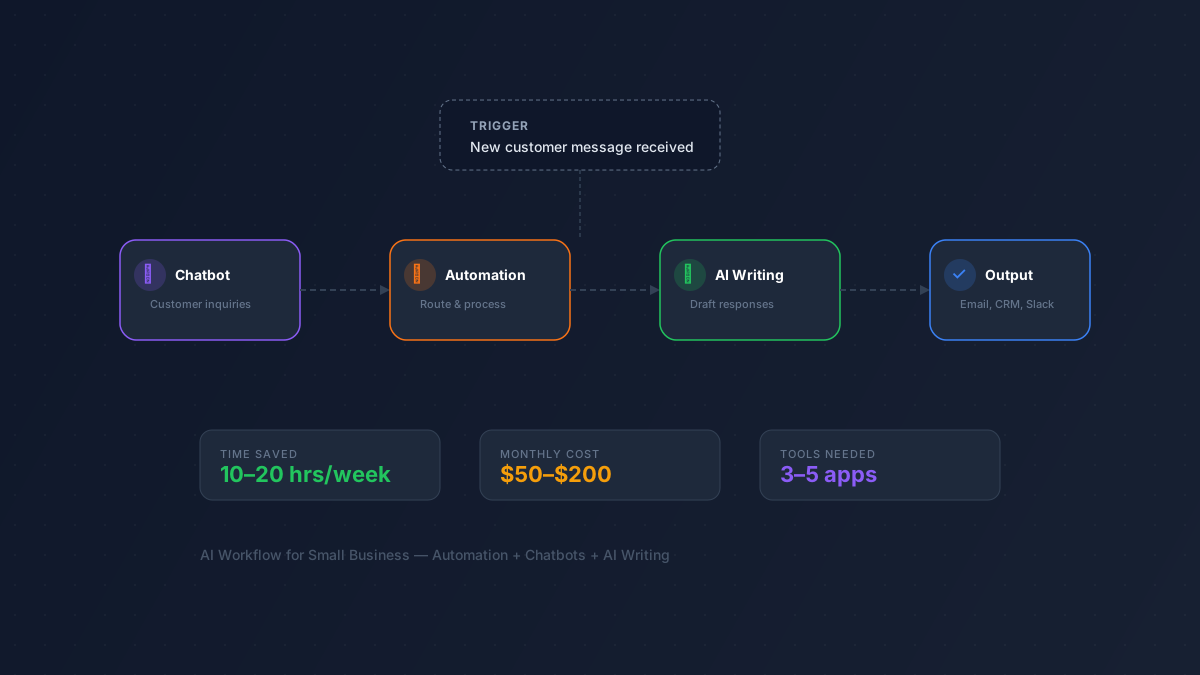
- A complete small business AI stack costs $50–$200/month and can save 10–20 hours/week.
- You don't need coding skills — most modern AI tools connect via no-code integrations.
What Is an AI Workflow?
An AI workflow is a chain of connected tools that automate a business process using artificial intelligence. Instead of switching between 6 apps to respond to a customer inquiry, your AI workflow does it automatically: a chatbot handles the first response, an automation platform routes the message to the right team, and a writing tool drafts the follow-up email.
Think of it like an assembly line for knowledge work. Each AI tool handles one step, and automation glue connects them all.
Step 1: Identify Your Biggest Time Sinks
Before picking tools, audit where your team spends the most time on repetitive work. Common candidates:
| Business Area | Time Drain | AI Solution | Tools |
|---|---|---|---|
| Customer support | Answering the same questions | AI chatbot + knowledge base | Tidio, Intercom, Chatbase |
| Content creation | Writing blog posts, emails, social | AI writing + scheduling | Jasper, Copy.ai, Buffer |
| Lead management | Following up with prospects | AI email sequences | Instantly, Lemlist |
| Data entry | Moving data between apps | Automation platform | Zapier, Make, n8n |
| Meetings | Taking notes, writing summaries | AI meeting assistant | Fireflies.ai, Otter.ai |
| Scheduling | Back-and-forth for appointments | AI scheduling | Calendly, Reclaim.ai |
Rule of thumb: If a task is repetitive, follows a pattern, and doesn't require creative judgment, it's ripe for AI automation.
Step 2: Choose Your Automation Backbone
Every AI workflow needs a central hub that connects your tools. These automation platforms act as the glue:
Zapier — Best for Beginners
Zapier connects 6,000+ apps with a simple "if this, then that" logic. No coding required. It's the most beginner-friendly option and has the largest integration library.
Pricing: Free tier (100 tasks/month). Starter at $29.99/month.
Make — Best for Complex Workflows
Make (formerly Integromat) offers a visual workflow builder that's more powerful than Zapier for multi-step, branching automations. It's often cheaper for high-volume use.
Pricing: Free tier (1,000 operations/month). Core at $10.59/month.
n8n — Best for Technical Teams
n8n is open-source and self-hostable, giving you full control. It's ideal if you have a developer on the team and want to avoid per-task pricing.
Pricing: Free (self-hosted). Cloud starts at $24/month.
Step 3: Add AI to Your Customer-Facing Channels
The highest-impact starting point for most small businesses is customer support. An AI chatbot can handle 60–80% of routine inquiries instantly.
Top picks from our chatbot directory:
- Tidio — AI + live chat combo, great for e-commerce. Free plan available.
- Chatbase — Train a chatbot on your own docs and website content.
- Intercom — Enterprise-grade with AI resolution (Fin AI Agent).
- Botpress — Open-source chatbot builder for custom flows.
Pro tip: Start by feeding your chatbot your FAQ page and top 20 support tickets. That alone can deflect 50%+ of inquiries.
Step 4: Automate Your Content Pipeline
Content creation is the second-biggest time sink for small businesses. Here's a sample AI content workflow:
- Research: Use Frase or Semrush to find keywords and generate content briefs.
- Draft: Use Jasper or Copy.ai to generate first drafts from the brief.
- Edit: Use Grammarly to polish grammar and tone.
- Optimize: Use Surfer SEO to ensure the content is SEO-optimized.
- Publish & distribute: Use Zapier to auto-publish to WordPress and share via Buffer on social media.
This workflow takes a blog post from idea to published in under 2 hours, compared to 6–8 hours manually. Browse more options in our copywriting tools and SEO tools categories.
Step 5: Connect Everything Together
Here's what a complete small business AI stack looks like, with approximate monthly costs:
| Layer | Tool | Monthly Cost | What It Does |
|---|---|---|---|
| Automation hub | Make or Zapier | $10–$30 | Connects all your tools |
| Customer support | Tidio | Free–$29 | AI chatbot + live chat |
| Content writing | Copy.ai | Free–$49 | Blog posts, emails, social copy |
| SEO | Frase | $15 | Content briefs + optimization |
| Meeting notes | Fireflies.ai | Free–$19 | Auto-transcribe + summarize meetings |
| Scheduling | Calendly | Free–$12 | Automated appointment booking |
| Total | $50–$155/mo |
This stack handles customer support, content creation, SEO, meeting management, and scheduling — all with AI assistance. For most small businesses, this replaces 10–20 hours of manual work per week.
Common Mistakes to Avoid
- Automating everything at once. Start with one workflow, prove it works, then expand.
- Ignoring the human check. AI drafts and chatbot responses should be reviewed, especially early on.
- Paying for enterprise tools. Small business needs are well-served by $10–$50/month tools. Don't overpay for features you won't use.
- Not measuring results. Track time saved and tasks automated. If a tool isn't saving you time, drop it.
Frequently Asked Questions
How much does an AI workflow cost for a small business?
A functional AI workflow typically costs $50–$200/month depending on tool choices. Many tools have free tiers, so you can start at near-zero cost and upgrade as you see results. The ROI usually appears within the first month through time savings alone.
Do I need technical skills to set this up?
No. Zapier and Make are designed for non-technical users with drag-and-drop interfaces. Most AI tools mentioned here have simple setup wizards. If you can use email, you can set up a basic AI workflow.
What's the best first automation to set up?
Customer support is the highest-impact starting point for most businesses. Setting up an AI chatbot (like Tidio or Chatbase) on your website can deflect 50%+ of routine inquiries immediately. It's fast to set up and the ROI is immediate.
Can AI tools work together without Zapier or Make?
Some tools have native integrations (e.g., Jasper to WordPress, Surfer to Google Docs). But for connecting more than 2–3 tools into a real workflow, an automation platform is essential. It's the backbone that makes everything flow together.
How do I know if my AI workflow is actually saving time?
Track two metrics before and after: (1) hours spent per week on the automated task, and (2) output volume (emails sent, articles published, tickets resolved). Most businesses see a 40–60% reduction in time spent within the first month.
Ready to build your AI stack? Start by exploring our automation tools, chatbot platforms, and productivity tools. Or browse all 950+ AI tools.