Key Takeaways
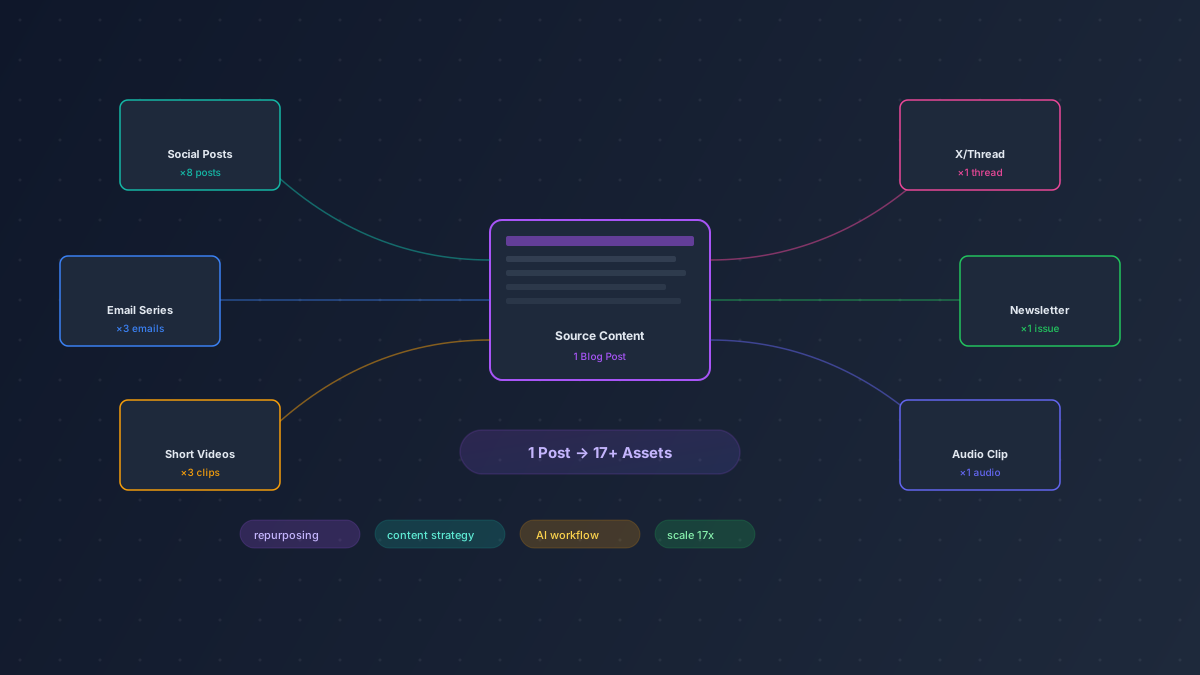
- One solid blog post can become 17+ distinct content assets — we've done it repeatedly, and the ROI compounds fast.
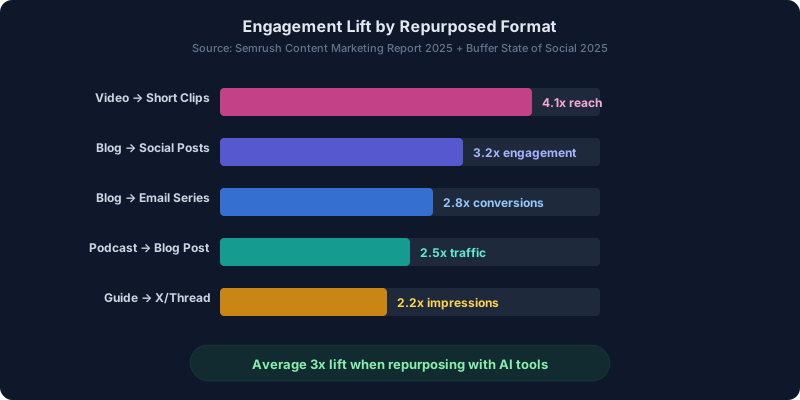
- Text-to-text repurposing is the lowest effort starting point; text-to-video delivers the highest reach multiplier (up to 4.1x).
- You don't need 12 different AI tools. Three or four, chosen well, cover 90% of repurposing workflows.
- The priority matrix below ranks every method by effort vs. impact so you can stop guessing what to repurpose first.
- Automation matters, but editorial judgment matters more — AI handles the grunt work, you handle the angle.
Most content teams are sitting on a goldmine and don't realize it. That 2,000-word blog post you published last Tuesday? It's not a blog post. It's a raw material stockpile — social threads, email sequences, video scripts, podcast segments, infographics, and about a dozen other formats waiting to be extracted.
I've been repurposing content professionally since before AI tools made it easy, back when it meant manually rewriting the same ideas in Google Docs until your eyes glazed over. Now? The whole process takes a fraction of the time. But here's what most people get wrong: they treat repurposing like copying and pasting into a new shape. That's not repurposing. That's being lazy.
Real repurposing means re-angling. You take the same core insight and reframe it for a different audience, platform, or consumption mode. AI tools are spectacular at the mechanical part of this — the reformatting, the summarizing, the adapting of tone. The strategic part? That's still on you.
Below are 15 methods I've personally tested, organized by format type, with specific tool recommendations and honest notes on what actually works versus what sounds good in theory.
Group 1: Text to Text
This is where most people should start. Lowest barrier, fastest turnaround, and you can knock out five assets during a single coffee break.
1. Blog Post to Social Media Posts
Pull three to five standalone insights from your article and write native posts for LinkedIn, X, and Instagram carousels. Don't just grab your subheadings — find the surprising stats, the contrarian takes, the "wait, really?" moments. Those perform.
Buffer handles scheduling across platforms, while Copy AI can generate platform-specific variations from a single input paragraph. I usually generate 8-10 options and keep the best 4. The AI-written ones that try too hard to be clever? Delete those immediately.
2. Blog Post to Email Series
A single comprehensive guide can fuel a 3-5 part email drip sequence. Break it by subtopic, not by section. Each email needs its own hook and its own payoff — nobody wants to read "Part 3 of 5" if Part 3 doesn't stand alone.
Jasper does a solid job rewriting blog content into conversational email tone. Set the voice to something casual and direct. The default output tends to be a bit stiff, so I always do a pass to add contractions and cut the filler.
3. Blog Post to Twitter/X Thread
Threads still work absurdly well for B2B reach. The formula: open with a bold claim or result, break the middle into bite-sized lessons (one per tweet), close with a CTA or resource link. Aim for 7-12 tweets.
Here's the trick — don't let AI write the hook tweet. Write that yourself. It's the one piece that determines whether anyone reads the rest. Let Copy AI draft the supporting tweets, then reorder them for narrative flow.
4. Long-Form Guide to Checklist
Checklists are criminally underrated as lead magnets. Take any how-to guide, strip it down to actionable steps, and format it as a downloadable PDF or interactive checklist. I've seen conversion rates on checklist opt-ins hit 8-12%, which blows away standard ebook offers.
Canva has solid checklist templates, and you can use any AI writing tool to distill 3,000 words into 15-20 action items. The hard part isn't making the checklist — it's resisting the urge to over-explain each item.
5. FAQ Section to Individual Posts
If your article has an FAQ section (like this one does), each Q&A pair is a standalone social post or short blog entry. Expand the answer slightly, add a real example, and you've got content that targets long-tail search queries naturally.
This one barely needs AI. But if you want to scale it, Jasper can expand a 2-sentence answer into a 150-word mini-post with context and a CTA. Run through 10 FAQs in about 20 minutes.
Group 2: Text to Audio/Video
This is where the reach multiplier gets serious. Video and audio formats reach people who'll never read your blog. Different consumption habits, different platforms, different audiences entirely.
6. Blog Post to Short-Form Video
Take your strongest blog insight — just one — and turn it into a 30-60 second vertical video. Talking head, text overlay, or a mix of both. Short-form video on Reels, TikTok, and YouTube Shorts is still the highest-reach organic format available in 2026. Not gonna lie, the numbers are hard to ignore.
InVideo lets you paste a blog URL and generates a video draft automatically. The results are decent starting points. Pictory does something similar with more control over scene selection. Both save hours compared to building from scratch in a traditional editor.
7. Blog Post to Podcast Snippet
Record yourself riffing on your blog's main argument for 5-10 minutes. Don't read the post — talk about it like you're explaining it to a colleague. That conversational energy is what makes podcast content sticky.
Descript is the tool here. Record, edit by deleting text in the transcript (seriously, it's that easy), add intro/outro, export. You can also pull audiograms for social sharing with Headliner, which turns audio clips into waveform videos optimized for feeds.
8. Article to Explainer Video
Explainer videos work particularly well for technical or process-heavy content. Think "how X works" or "why Y matters" style posts. The visual component helps with comprehension in ways text alone can't.
Pictory handles this format well — it'll match stock footage to your script sections and generate a narrated video. For more polish, InVideo gives you finer control over animations and transitions. Budget 30-45 minutes per explainer if you want something you're not embarrassed to post.
9. Long Post to Short Clips
Already have a long video or webinar recording? This is the single highest-ROI repurposing move. One 45-minute video can yield 10-15 short clips, and those clips will collectively outperform the original by 3-5x in total reach.
Opus Clip is the standout tool for this. It uses AI to identify the most engaging segments, adds captions, and formats for vertical. Vidyo AI does similar work and handles multi-speaker content well. CapCut gives you more manual control if you prefer to pick your own moments.
10. Guide to Webinar/Presentation Slides
Turn a comprehensive guide into a slide deck for webinars, conference talks, or SlideShare. Each major section becomes 2-3 slides. Add data points as visual callouts. Keep text minimal — if your slides are paragraphs, you've made a document, not a presentation.
Canva has AI-assisted slide generation that's genuinely useful now. Feed it your outline, pick a template, and it'll populate a deck. You'll want to edit aggressively — the default layouts tend to cram too much onto each slide — but it beats starting from a blank canvas.
Group 3: Cross-Format
These methods go in reverse or sideways — audio to text, video to text, data to visuals. They're slightly more involved but unlock content for audiences you're currently missing.
11. Podcast Episode to Blog Post
Transcribe your podcast, then restructure the best segments into a written article. This isn't about publishing a transcript (please don't do that). It's about extracting insights that were articulated verbally and giving them written structure, links, and formatting.
Descript handles transcription and lets you highlight the best quotes directly in the transcript view. From there, use Jasper or Copy AI to rewrite conversational speech into polished prose. A 40-minute episode usually yields a 1,500-2,000 word post.
12. Video to Blog Post
Same principle as podcast-to-blog, but with the added bonus of being able to pull screenshots and frame grabs for the written version. Tutorial and demo videos translate especially well because the step-by-step structure is already there.
Descript transcribes video just as cleanly as audio. For YouTube content specifically, you can often grab the auto-generated transcript as a starting point, though the quality varies wildly depending on audio clarity.
13. Data/Research to Infographic
Got a post heavy on statistics, survey results, or comparison data? Pull the numbers out and visualize them. Infographics still get shared heavily on Pinterest, LinkedIn, and in Slack channels. They're also link magnets when other bloggers reference your data.
Canva remains the go-to for infographic creation. Their chart tools have gotten surprisingly capable, and the AI layout suggestions actually save time now. Pro tip: vertical infographics outperform horizontal ones on every platform except desktop-first blogs.
14. Product Review to Comparison Table
If you've written individual reviews of competing tools, merge the key data points into a comparison table or versus-style post. These consistently rank well for "[tool A] vs [tool B]" search queries, which tend to have strong purchase intent.
This one's more of a manual process, but Zapier can automate pulling structured data from your existing reviews into a spreadsheet format. From there, build your comparison page. We do this on ToolIndex for our content optimization and copywriting tool categories.
15. Webinar Recording to Course Module
Webinars have a terrible shelf life as replays. But chop them into focused 5-10 minute segments, add quizzes or reflection prompts, and suddenly you have course content. This works especially well for educational and B2B SaaS brands building learning libraries.
Opus Clip or Vidyo AI can handle the initial segmentation. You'll need to add context slides or bumpers between modules, but the heavy lifting — finding natural start and end points in a long recording — is exactly what AI clipping tools excel at.
The Repurposing Priority Matrix
Not all repurposing moves are equal. Some take 10 minutes and drive real traffic. Others eat an afternoon and get 12 impressions. I built this matrix after tracking results across about 200 repurposing cycles over the past year. Use it to decide what to do first.
| Source Format | Target Format | Effort | Impact | Priority Score | Best Tool |
|---|---|---|---|---|---|
| Blog Post | Social Posts (LinkedIn/X) | Low | High | 9 | Buffer |
| Long Video | Short Clips | Low | High | 9 | Opus Clip |
| Blog Post | Email Series | Med | High | 8 | Jasper |
| Blog Post | X Thread | Low | Med | 8 | Copy AI |
| Podcast | Blog Post | Med | High | 7 | Descript |
| Blog Post | Short-Form Video | Med | High | 7 | InVideo |
| Guide | Checklist Lead Magnet | Low | Med | 7 | Canva |
| Data Post | Infographic | Med | Med | 6 | Canva |
| Webinar | Course Modules | High | High | 6 | Vidyo AI |
| Reviews | Comparison Table | High | Med | 5 | Zapier |
Start at the top. The blog-to-social and long-video-to-clips workflows deliver the best return for the least time invested. Work your way down as your process matures.
The 1-to-17 Workflow
Let's get concrete. Here's exactly how one blog post — say, a 2,500-word guide on building an AI content pipeline — becomes 17 separate content assets. I've done this workflow dozens of times. It takes about 3-4 hours total, spread across a week.
Day 1 — Publish and Extract (45 minutes)
- The original blog post goes live on your site. That's asset #1.
- Pull 5 standalone insights and write 5 social media posts — two for LinkedIn, two for X, one for Instagram. Use Copy AI for first drafts, then edit for voice. Assets #2-6.
- Turn the post's step-by-step section into a downloadable checklist using Canva. Asset #7.
Day 2 — Thread and Email (30 minutes)
- Write an X thread walking through the main argument in 8-10 tweets. Asset #8.
- Break the post into a 3-part email series with Jasper. Each email covers one major section with a fresh hook. Assets #9-11.
Day 3 — Video (60-90 minutes)
- Record a 5-minute talking-head video discussing the post's main takeaway. Don't script it word for word — bullet points are enough.
- Edit in Descript and publish as a YouTube video. Asset #12.
- Use Opus Clip to pull 3 short clips (under 60 seconds each) from the recording. Assets #13-15.
Day 4 — Visual and Audio (45 minutes)
- Pull the key stats from the post and create an infographic in Canva. Asset #16.
- Extract the audio from your video, clean it up in Descript, and publish as a podcast snippet or audiogram via Headliner. Asset #17.
That's 17 assets from one blog post. Total active work time: roughly 3 to 4 hours. Compare that to creating 17 pieces of original content from scratch, which would take... I don't even want to do the math. Weeks, probably.
The important thing: each asset is tailored to its platform. The LinkedIn post doesn't read like a tweet. The email doesn't read like the blog. The video isn't someone reading the article out loud. Every piece is adapted, not just reformatted.
Picking the Right Tools Without Overspending
You don't need subscriptions to everything mentioned above. Here's the minimal stack I'd recommend based on what you're repurposing most often:
If you're mostly doing text-to-text: Copy AI or Jasper plus Buffer for scheduling. That's it. Maybe Canva for the occasional checklist or carousel.
If you're going heavy on video: Descript for recording and editing, Opus Clip for clipping, and CapCut for quick touch-ups. InVideo or Pictory if you need to generate videos from text without recording yourself.
If you want to automate the pipeline: Add Zapier to connect your CMS, email platform, and social scheduler. Set up triggers so publishing a blog post automatically kicks off your repurposing workflow — draft social posts land in a review queue, the post gets queued for email adaptation, etc.
For more recommendations, check our full guides on the best AI writing tools for 2026 and the best AI video tools this year.
Common Mistakes That Tank Your Results
Publishing the transcript as a blog post. I see this constantly. Someone records a podcast, runs it through transcription, does a light grammar pass, and hits publish. The result reads like someone rambling. Spoken language and written language have completely different structures. Always rewrite, don't just clean up.
Repurposing everything. Not every post deserves the full 17-asset treatment. Some posts are timely and will be irrelevant in two months. Some are thin and don't have enough substance to split. Focus your repurposing energy on evergreen, high-performing content. Check your analytics — your top 10 posts by traffic are where you should start.
Ignoring platform norms. A LinkedIn post that reads like a tweet will flop. An Instagram carousel that looks like a PowerPoint slide will get scrolled past. Each platform has unwritten rules about tone, length, and visual style. AI can adapt the words, but you need to verify the output actually fits.
Skipping the editorial pass. AI-generated repurposed content has a sameness to it. Similar sentence structures, similar transitions, similar energy. Always read through the output and inject your own voice, opinions, and specific examples. That's what makes it yours instead of generic.
Browse our social media tools and video generator categories to find tools that match your specific workflow needs.
Frequently Asked Questions
How many content pieces can you realistically create from one blog post?
With a structured workflow, one solid blog post (1,500+ words) can yield 15-20 distinct assets. We've consistently hit 17 using the method outlined above. The ceiling depends on how much substance the original post has — a 500-word listicle won't stretch as far as a deep-dive guide with original data.
Does repurposed content hurt SEO because of duplicate content?
No. Google's duplicate content concerns apply to publishing the same text on multiple URLs. Repurposing means adapting content into different formats for different platforms — a social post, a video, an email. These aren't competing with your blog post in search results. They're driving traffic back to it. The only risk is if you publish near-identical blog posts on multiple domains, which isn't what we're talking about here.
What's the best AI tool for content repurposing overall?
There's no single winner because the "best" tool depends on your target format. For text-to-text, Jasper and Copy AI are both strong. For video clipping, Opus Clip is hard to beat. For an all-in-one approach to recording and editing, Descript covers the most ground. If I had to pick just one tool for a text-heavy repurposing workflow, I'd go with Copy AI for its flexibility.
How do you maintain brand voice when AI is doing the rewriting?
Create a brief voice guide — 5-10 bullet points covering your tone (casual vs. formal), vocabulary preferences, phrases you always use, phrases you never use. Paste it into AI tool prompts as context. Then always do a manual pass on the output. AI gets you 70-80% of the way there. The last 20% — the stuff that sounds like you and not like everyone else — requires human editing.
Should I repurpose old content or only new posts?
Start with old content, actually. Your best-performing evergreen posts are proven — you already know the topics resonate. Repurposing them into new formats gives high-value content a second (or third) life on platforms where it's never appeared. Once you've worked through your back catalog's greatest hits, build repurposing into your workflow for new content going forward.
How long does the full repurposing workflow take?
The 1-to-17 workflow described above takes 3-4 hours of active work spread across about a week. That's with AI tools handling the heavy lifting. Without AI, the same output would take roughly 12-15 hours. The time savings come mainly from first-draft generation — AI writes the rough versions, you refine and approve. As you build templates and routines, the per-post time drops further.
Is it worth repurposing content if I have a small audience?
Especially if you have a small audience. Small audiences mean you can't afford to create net-new content for every platform — you don't have the team or the budget. Repurposing lets you show up on LinkedIn, YouTube, email, and X without quadrupling your content production effort. It's how solo creators and lean teams compete with bigger operations that have dedicated writers for each channel.
Ready to build your own repurposing machine? Browse our content optimization tools to find the right AI stack for your workflow — we've reviewed and categorized hundreds of tools so you don't have to test them all yourself.